Tech
Jan 20, 2026
How We Built a Scalable Storefront SDK for Merchant Websites

TL;DR
To give merchants more control over how customers start their ordering journey, we built the Storefront SDK - a lightweight, embeddable Javascript SDK that lets merchants add customizable ordering widgets directly to their websites. In this blog, we share how the SDK works under the hood, the architectural and design decisions behind it (from Shadow DOM and on-demand loading to caching and versioning), and the lessons we learned building a scalable, low-friction SDK that works reliably across.
Introduction
Storefront is a white-label solution that enables merchants, especially those with limited technical, financial, or time resources – to transform their existing websites into fully functional online ordering experiences powered by Wolt’s platform (learn more).
While Storefront powers the ordering flow itself, one key challenge remains: we have limited control over the very top of the funnel - the merchant’s website. As a result, the customer experience at the entry point can vary widely depending on how each merchant integrates and presents Storefront.
This raised a fundamental question for us: how do you ship an embeddable UI that works reliably across thousands of unknown websites, stays fast, avoids conflicts, and can evolve safely over time without creating a heavy support burden?
To address this, we built the Storefront SDK as a simple, embeddable JavaScript script that works out of the box across both common site builders and custom websites. It allows merchants to embed customizable ordering widgets with minimal setup, while ensuring the integration remains reliable, performant, and easy to maintain.
The SDK is designed with scalability in mind, using a modular architecture that can evolve alongside our product and as merchant needs grow. By eliminating the need for manual Storefront URL updates, which previously required time-consuming coordination, the SDK keeps integrations automatically up to date and enables a faster, more consistent customer experience across merchant sites.
How It Works at a High Level
The diagram below illustrates this flow at a high level:
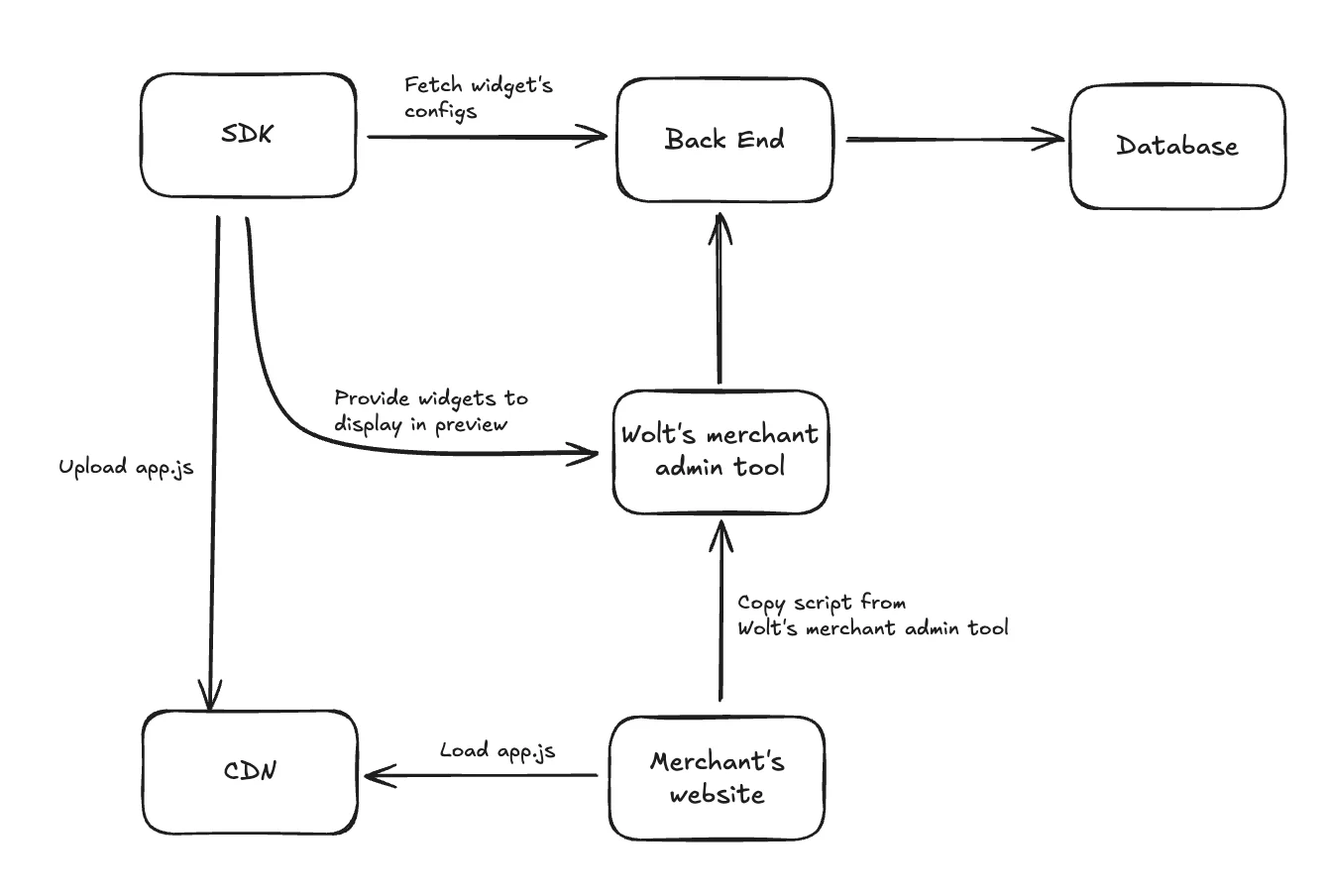
Merchants who have Storefront venues can access the Wolt's merchant admin tool to customize the components provided by the SDK such as the floating button or modal. On the customization page, they can adjust styles like color, shape, text, and position. The SDK dynamically generates a code snippet that reflects their selected configuration.
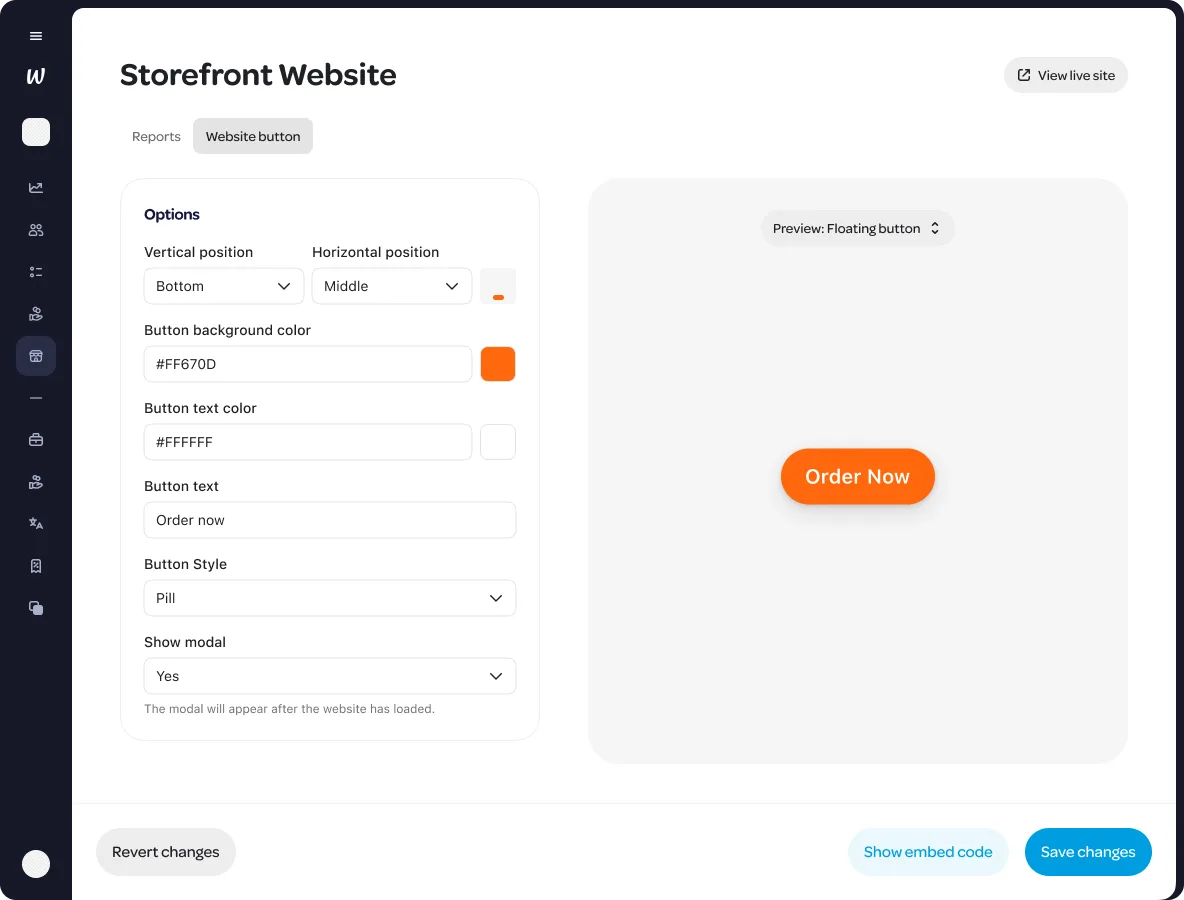
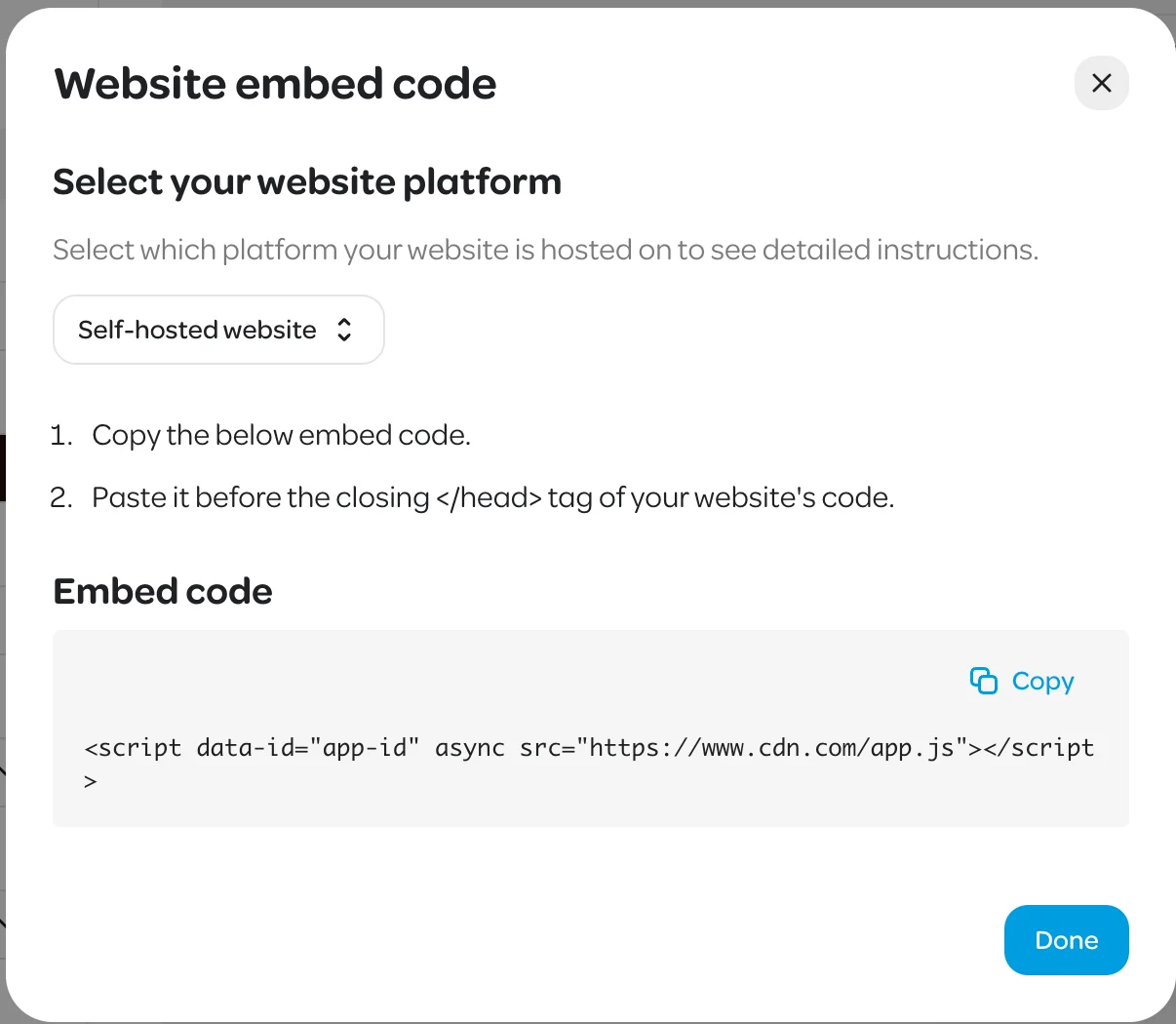
Once satisfied, merchants can:
Copy the generated snippet and embed it into their website.
Save the configuration, which stores the widget styles in the backend.
From there, the integration becomes seamless:
When a user visits the merchant’s site, the embedded SDK:
Fetches the saved configuration from the Back End.
Renders the customized component using the merchant’s styling.
Automatically links to the correct merchant’s storefront page.
This flow ensures that merchants can independently customize and deploy Storefront components without needing engineering support or manual coordination which results in faster setup and less ongoing maintenance.
Runtime Architecture: The Core of the SDK
The Storefront SDK is built around a lightweight runtime engine that activates when the SDK script is embedded on a merchant’s site using an <script async/> tag. Loading the script asynchronously ensures it doesn’t block the host site’s rendering or impacts page performance.
At a high level, the runtime is responsible for three things:
Fetching the merchant’s widget configuration
Determining which UI components to render
Loading and rendering those components safely and efficiently
When a user visits a merchant’s website, the SDK is triggered via a <script> tag containing a data-id attribute. This data-id is the unique key used by the runtime to:
Fetch widget configuration from the backend.
Resolve which components to render based on widget types.
Dynamically load the required modules (e.g., floating button or modal).
Render each widget based on the merchant’s saved settings.
The diagram below illustrates how the runtime powers the widget rendering flow:
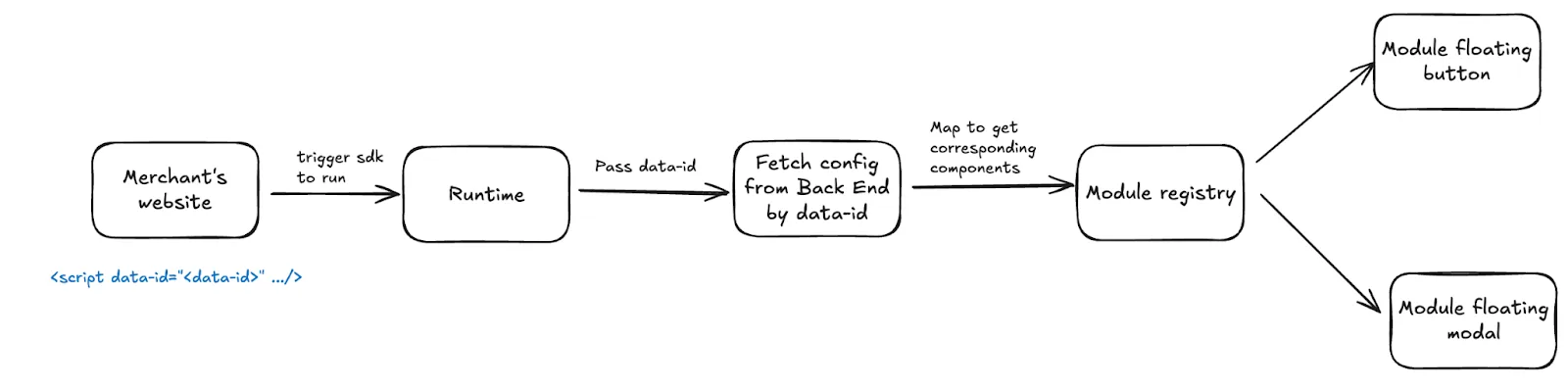
At the heart of this flow is the Module Registry which is a centralized map that links widget types to their respective module loader functions. The runtime uses this registry to determine which component should be rendered for each config entry.
Each Module is a self-contained unit responsible for rendering a specific UI element. Modules are isolated, dynamically loaded, and styled independently using Emotion and Shadow DOM to avoid conflicts with the host website. This modularity makes the SDK scalable and easy to extend as new widget types are introduced.
In short, the runtime is what transforms a single embedded <script> into a fully branded, production-ready storefront component without requiring additional setup, coordination, or ongoing maintenance.
Design Decisions Behind the Storefront SDK
While the Runtime Architecture explains how the SDK executes, it’s equally important to highlight the design choices that make the SDK flexible, maintainable, and easy to adopt. Each decision was made with a focus on developer experience, modularity, and long-term scalability. Below are some of the key design principles that shaped the Storefront SDK.
Shadow DOM
To prevent CSS conflicts between the host website and our embedded widgets, the SDK uses Shadow DOM to encapsulate all widget styles and markup. This ensures that styles from the merchant’s site do not leak into our components and that our styles don’t unintentionally affect the surrounding page.
A common choice for isolating third-party widgets is to use iframes, as they offer full encapsulation of both styles and scripts. However, while iframe-based rendering provides complete isolation, it also introduces additional complexity, limits flexibility, and adds performance overhead.
CSS in JS
To minimize setup requirements for merchants, the SDK uses a CSS-in-JS approach. This allows styles to be bundled directly with the script, eliminating the need for external CSS files or additional manual setup. As a result, merchants can simply embed the SDK, and the UI will render with the correct styling out of the box and no configuration required.
While styled-components is a popular choice in the CSS-in-JS ecosystem, it’s more heavyweight than necessary for our needs. We opted for Emotion, a lighter alternative that offers excellent developer ergonomics and scoped styling, without introducing unnecessary runtime overhead.
For our use case, rendering inline UI widgets, the Shadow DOM strikes a more optimal balance. It delivers strong style encapsulation with a lighter footprint, making it a more practical and performant choice.
Shared Components via NPM
Because the SDK and Wolt's merchant admin tool live in separate repositories, we needed a clean way to ensure the components rendered in the preview panel match exactly what users see on the live site.
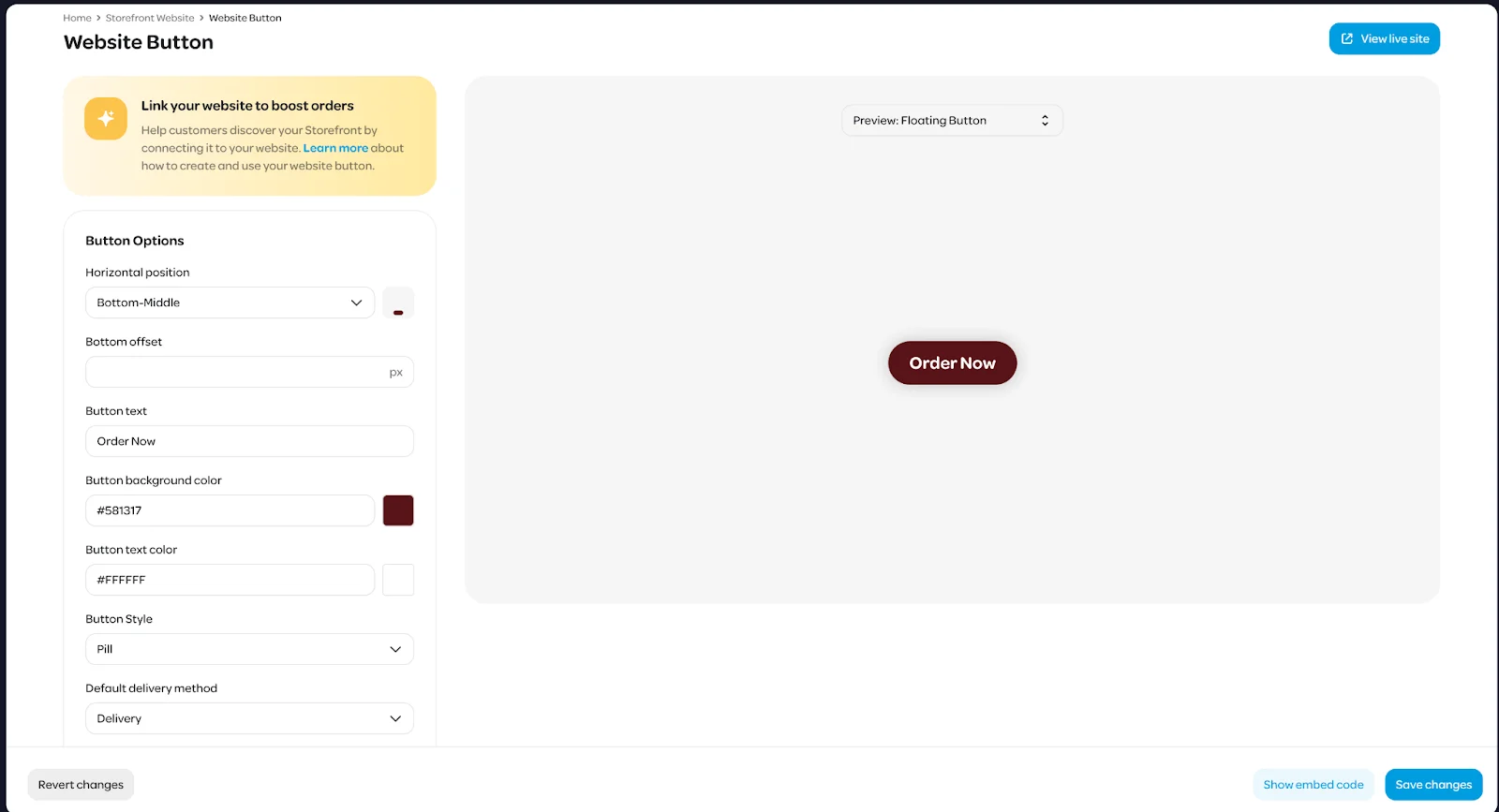
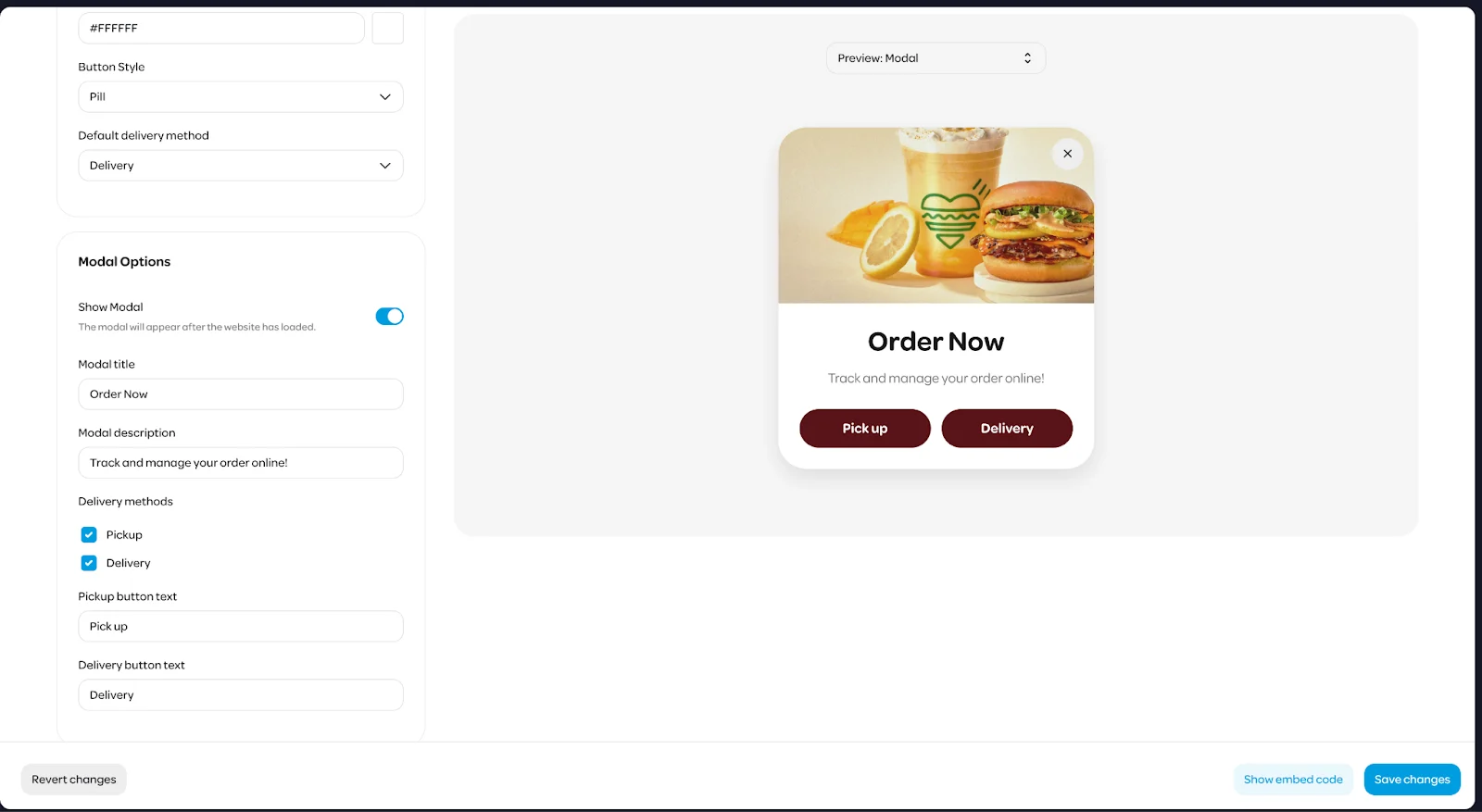
To solve this, we publish all SDK UI components as an NPM package that can be installed directly into the merchant site’s codebase. This allows the merchant site to render SDK widgets like floating buttons and modals within its own UI preview, using the exact same code that powers the production SDK.
To support this workflow, we designed each component in the SDK to follow a pure component architecture. That means:
Business logic and side effects (e.g., API calls) are handled in separate containers or runtime modules.
Pure components accept only props and are responsible solely for rendering UI.
The diagram below illustrates this separation between runtime logic and reusable UI, and how it’s shared across repositories via NPM:
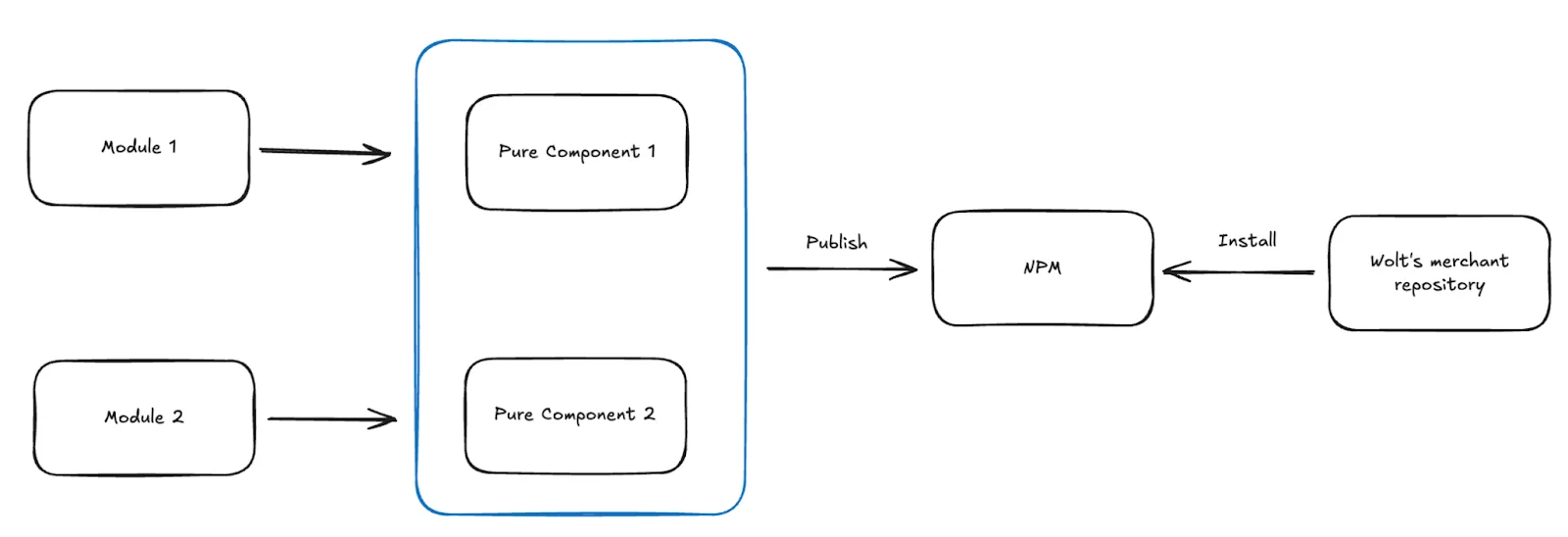
By cleanly separating logic from presentation, we ensure that previewing a widget inside the merchant admin interface reflects precisely what users will see on their actual storefront without duplicating logic or risking drift between environments.
On-Demand Component Loading
To keep the SDK lightweight and performant, we designed it to load only what is actually needed.
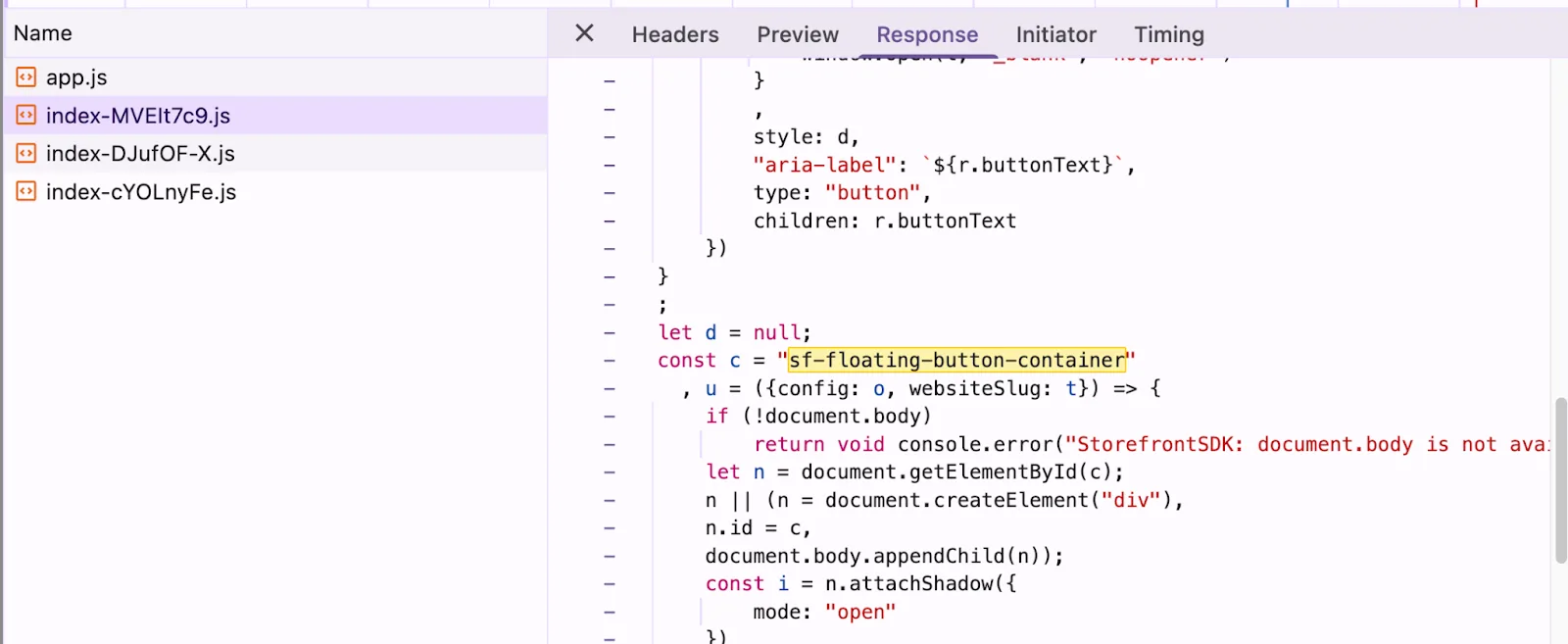
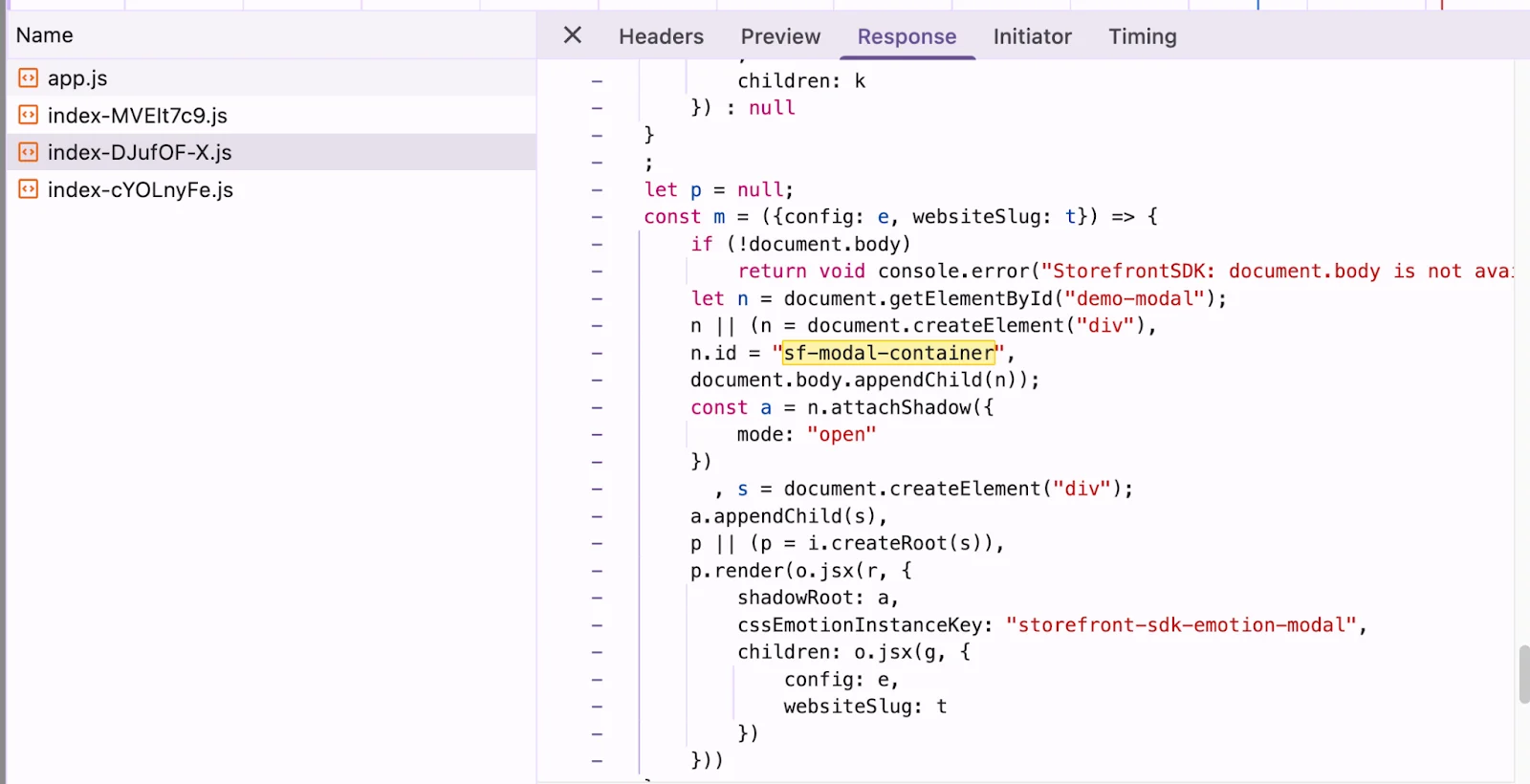
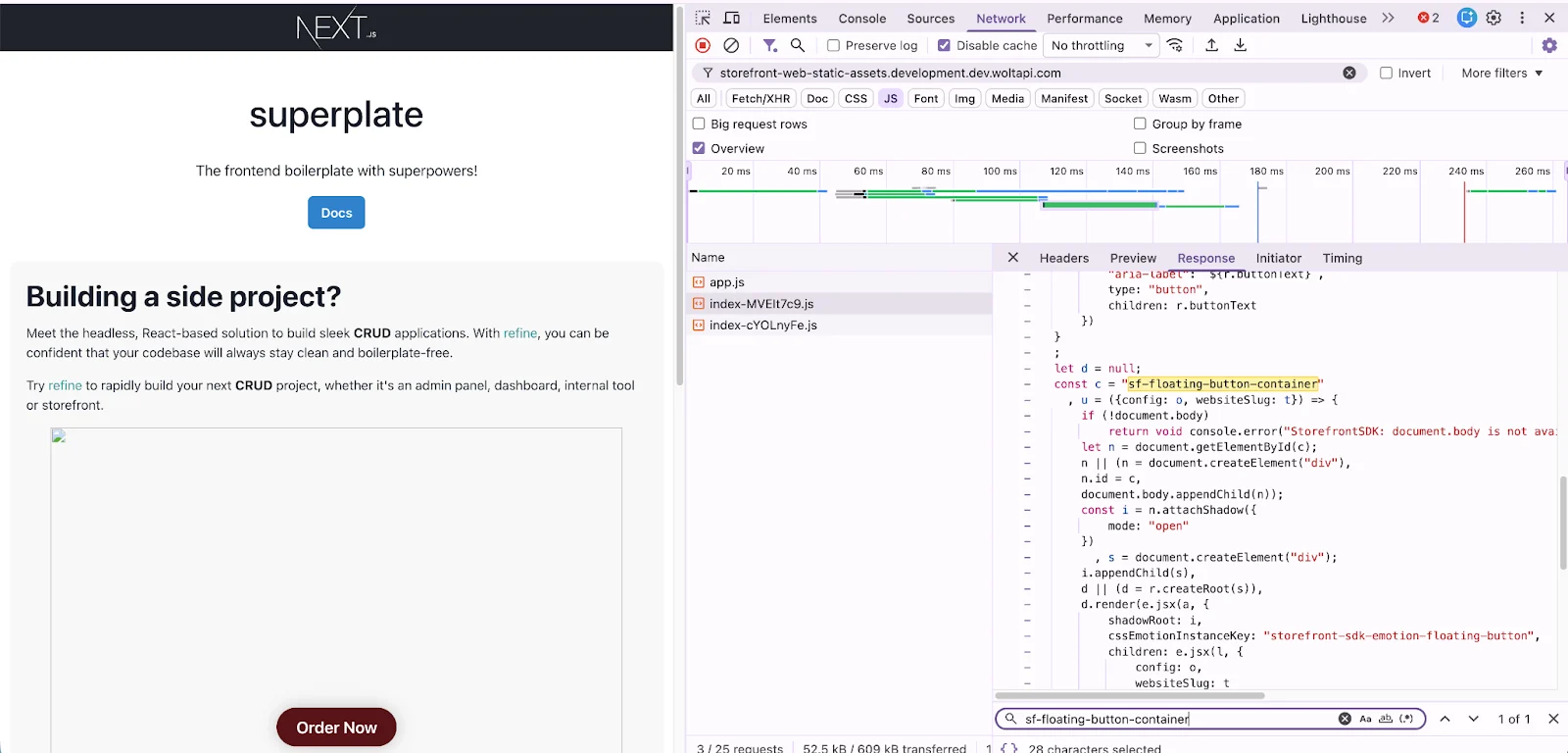
When the SDK initializes, it makes a single API call to retrieve the list of widgets associated with the merchant’s website. It only loads the modules required to render those specific components such as a floating button or a modal. Unused components are never downloaded or executed. This approach improves load times and reduces resource consumption.
On-demand loading also allows the SDK to scale gracefully over time. As we introduce new widget types, merchants who don’t use them incur no additional cost. The core bundle remains small, while functionality grows in a modular, predictable way.
Here are some screenshots demonstrating the “on-demand” loading
When merchant wants to show two widgets floating button and modal
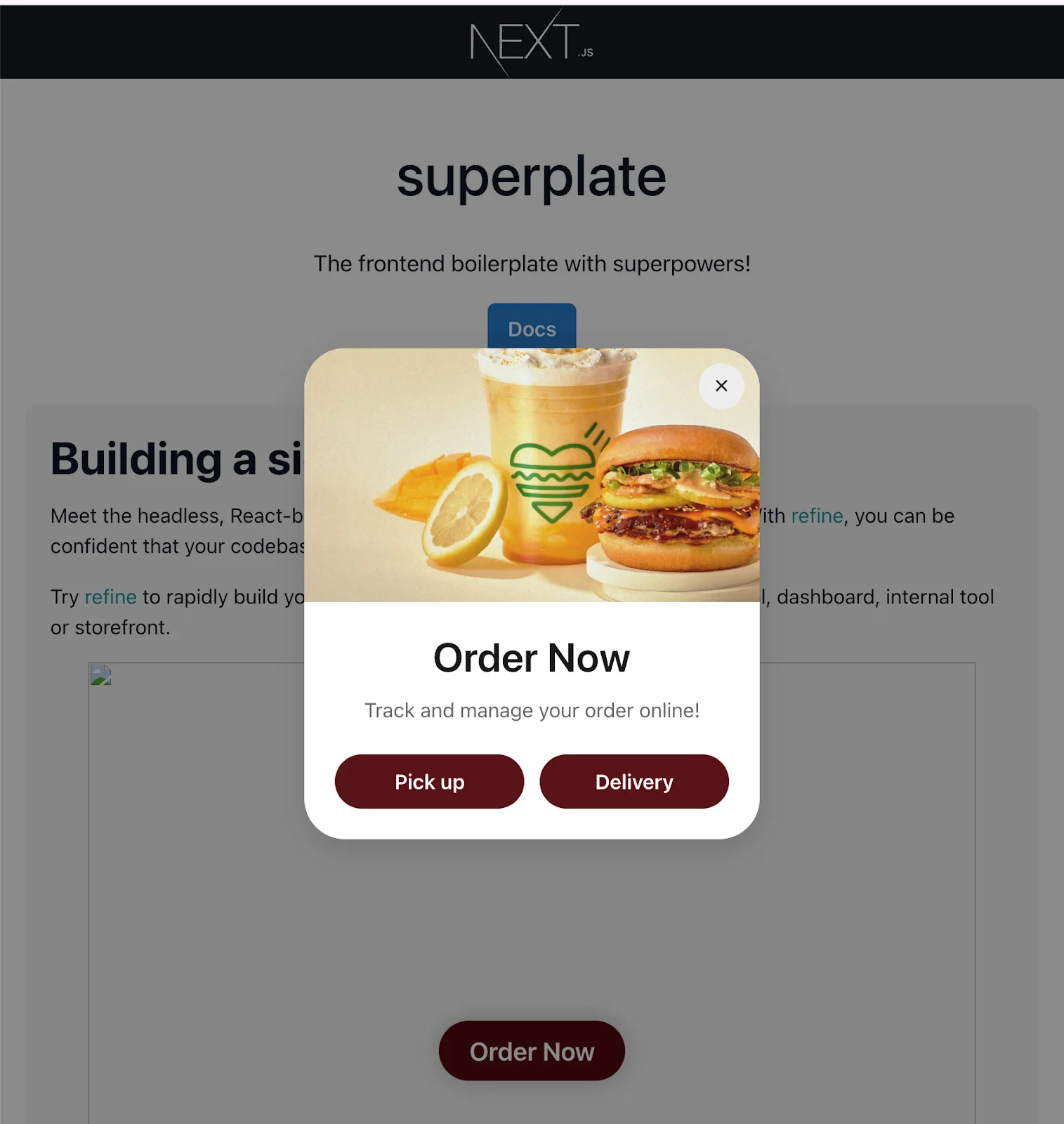
When merchant only wants to show a floating button
Backend Schema Flexibility
Originally, we defined a strict schema on the backend to explicitly list which CSS attributes merchants could configure via the Wolt Merchant site. While this provides type safety and validation, it can quickly become a bottleneck. Every time we want to support a new style like padding, font size, or border radius; it requires coordinated changes across both frontend and backend.
To remove this friction and enable faster iteration, we decided to make the backend schema more flexible. The API now accepts any valid CSS attributes sent by the frontend, shifting responsibility to the client to pass valid and supported styles.
With this approach:
Frontend gains full control over which CSS attributes are supported in the UI.
Backend becomes agnostic to style updates, reducing coupling between teams.
Future changes only require frontend work, allowing new styles to be rolled out faster without backend deployments.
This tradeoff works well in our context, where the frontend already owns the configuration UI and can ensure only safe, expected attributes are sent to the API.
Backend Cache Strategy
Since our SDK widgets are integrated into merchants’ websites, latency and reliability are critical. The SDK must load quickly without degrading the user experience, while still reflecting configuration changes in a timely manner.
To achieve this, we rely on effective caching through our CDN with the following cache control header:
Cache-Control: max-age=5, stale-while-revalidate=86400
This configuration means:
CDN cache’s TTL (Time To Live) is 5 seconds
After that, when a request is made and the cached response is older than 5 seconds, the CDN immediately serves the stale content to users (for up to 24 hours) while it asynchronously fetches a fresh version from the origin.
This approach provides two key benefits:
Low latency: Most requests are served directly from the CDN cache, keeping merchant sites fast and responsive.
Fast propagation of updates: When the cache expires, a new version is fetched in the background. This ensures that changes such as SDK updates or configuration modifications become visible quickly without causing request delays.
Result of load test:

Deploying and Versioning a Javascript SDK
We designed the deployment process for the Storefront SDK to support both rapid development and stable production releases, with clear separation between staging and production environments.
In the staging environment, deployment is triggered automatically whenever a pull request is merged into the main branch. The build process uploads the latest JavaScript bundle to an S3 bucket, where it’s served via the development CDN. No versioning is applied here, only the latest build is kept, allowing for fast iteration and internal testing.
In the production environment, the release process is triggered manually by publishing a GitHub release. This initiates two actions:
Uploading the built JS files to a versioned folder in the production S3 bucket (served via CDN).
Publishing a new version of the SDK to the NPM registry.
While versioning is essential for us internally, we also wanted to make sure that merchants never have to worry about it. To support that, we designed a stable URL structure that always serves the correct version of the SDK without requiring merchants to update their sites.
Managing SDK Versioning with a Stable URL
One of our core principles when designing the Storefront SDK was to keep integration simple and maintenance-free for merchants. In practice, this meant that the script tag used to load the SDK should never change.
Requiring merchants to update the script URL every time we publish a new release would introduce unnecessary overhead and break the seamless onboarding experience we aim to provide.
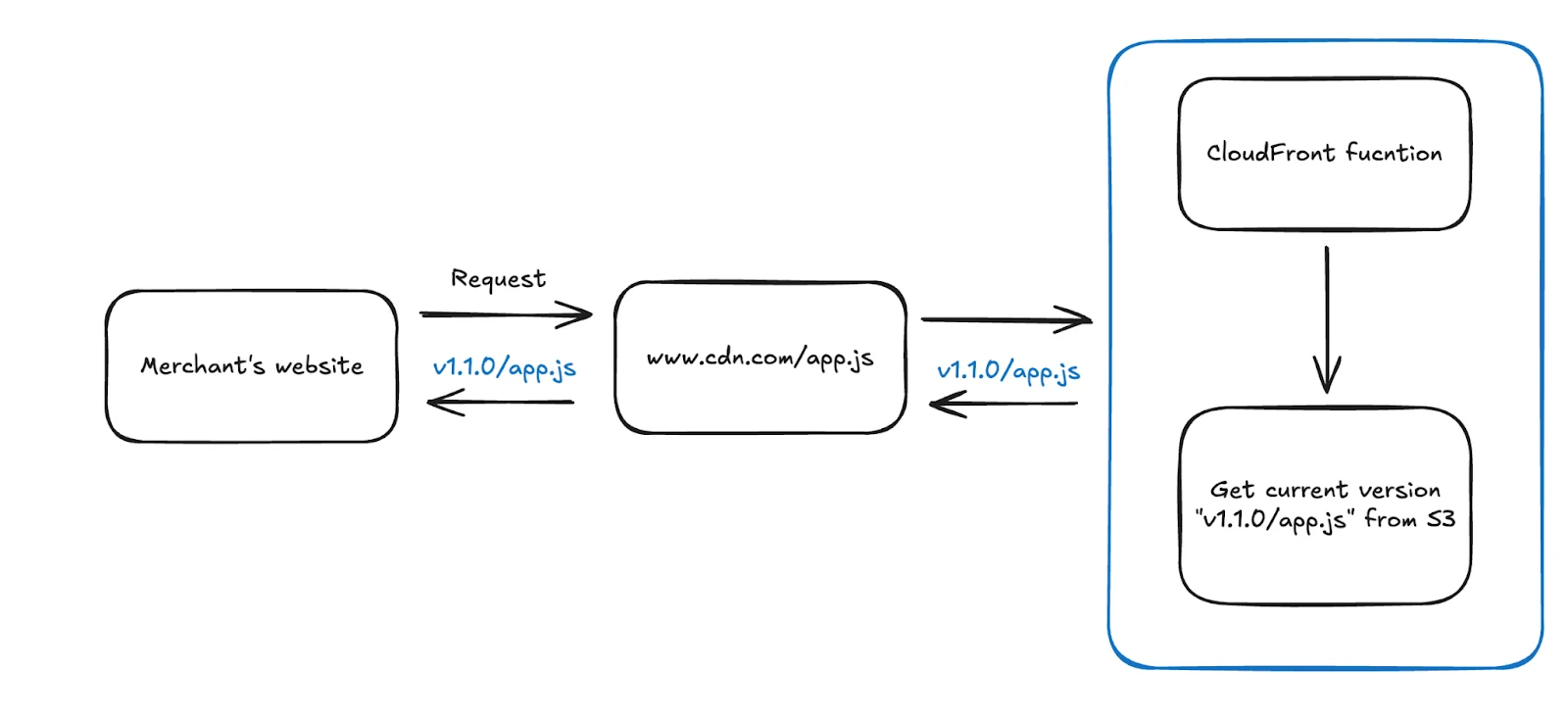
We needed a way to version our SDK internally while ensuring that merchants always use the latest stable release. Merchants would load the SDK through a single, unchanging URL:
https://www.cdn.com/app.js
The Original Idea: Dynamic Resolution via CloudFront
Our initial idea was to use a CloudFront Function to dynamically resolve the latest SDK version. When app.js was requested, CloudFront would internally redirect to the corresponding versioned folder, such as /v1.2.3/app.js.
While technically feasible, this approach added unnecessary engineering complexity and increased operational overhead.
Final Solution: Resolve the Version at Build Time
Instead of handling version resolution at runtime or at the CDN layer, we chose a simpler and more reliable approach: resolve the version at build time.
Here’s how it works:
Bump the version: During the release process, we update the version (e.g. v1.2.3) using tools like Changset.
Embed the version into app.js: At build time, the SDK’s entry script (app.js) is generated with the correct version number embedded. This version is then used by the runtime to construct full URLs to component files.
Upload to S3: The app.js file is uploaded to the root of our CDN path, while all versioned component files (e.g., component-a.js, component-b.js) are stored in separate folders named by their corresponding SDK version.
Runtime uses the embedded version: When app.js loads in the browser, it fetches only the components for that specific version which ensures the SDK remains consistent and predictable.
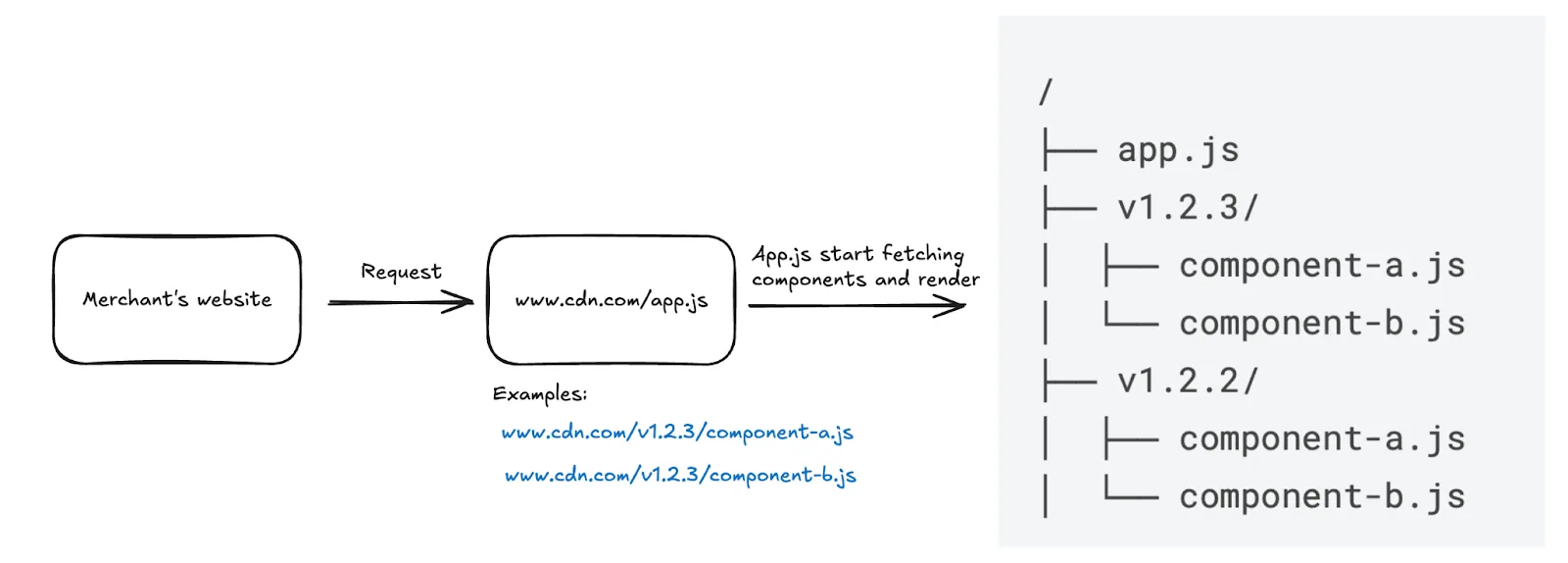
This structure allows us to:
Keep all release assets immutable and isolated
Roll back to any previous version safely
Serve the latest version automatically through a stable script URL
Ultimately, this build-time versioning strategy enables us to ship updates quickly and safely without requiring merchants to lift a finger.

Lessons from Merchant Onboarding
During the onboarding process with merchants, we encountered several edge cases that helped us improve the stability, compatibility, and developer experience of the Storefront SDK.
WordPress Integration: Building for Reliability
To make it easier for merchants using WordPress to integrate the Storefront SDK, we developed and published an official plugin: Wolt Storefront SDK for WordPress
While our early onboarding approach used general-purpose tools like WPCode to inject the SDK script, we realized that relying on third-party plugins didn’t align with the kind of experience we wanted to offer. Our goal is to provide merchants with a seamless, end-to-end journey when using Storefront, one that we can fully support and evolve over time.
By building and maintaining our own plugin, we’re able to deliver a more consistent, reliable, and fully integrated solution.
Benefits of the official plugin:
Predictable & reliable integration The plugin ensures the SDK is always loaded from Wolt’s official CDN and behaves consistently across WordPress environments.
Optimized script loading It includes performance enhancements like dns-prefetch and preconnect, which help browsers establish early connections to our CDN reducing perceived load times for users.
First-party support & maintenance As a Wolt-owned plugin, it’s actively maintained by our engineering team and kept in sync with the latest SDK releases and best practices.
A unified, end-to-end experience We want merchants to have everything they need from onboarding and configuration to integration within the Wolt ecosystem. Owning this plugin is a key step toward delivering that complete experience.
Hands-On Onboarding with Early Merchants
During the early rollout of the Storefront SDK, we took a highly collaborative approach to onboarding our first merchant partners. We scheduled live onboarding over Zoom, bringing together engineers, product managers, sales representatives, and the merchants themselves, to walk through the installation process step by step.
In these sessions, we guided merchants as they embedded the SDK into their websites in real time. This gave us immediate feedback on how the SDK behaved across different environments, and the overall UI, surfacing minor bugs and usability gaps that may not have been caught during internal testing.
This early feedback loop allowed us to iterate quickly, fix issues on the spot, and improve both the SDK and the onboarding experience before scaling to a fully self-serve model.
Today, onboarding is largely self-serve. We’ve added contextual guidance directly within the Wolt's merchant admin tool, helping merchants navigate the setup process without needing external documentation.

For those who still need help, our teams remain available to schedule Zoom calls and provide live support.
For additional step-by-step instructions, merchants can also refer to our Storefront SDK setup guide.
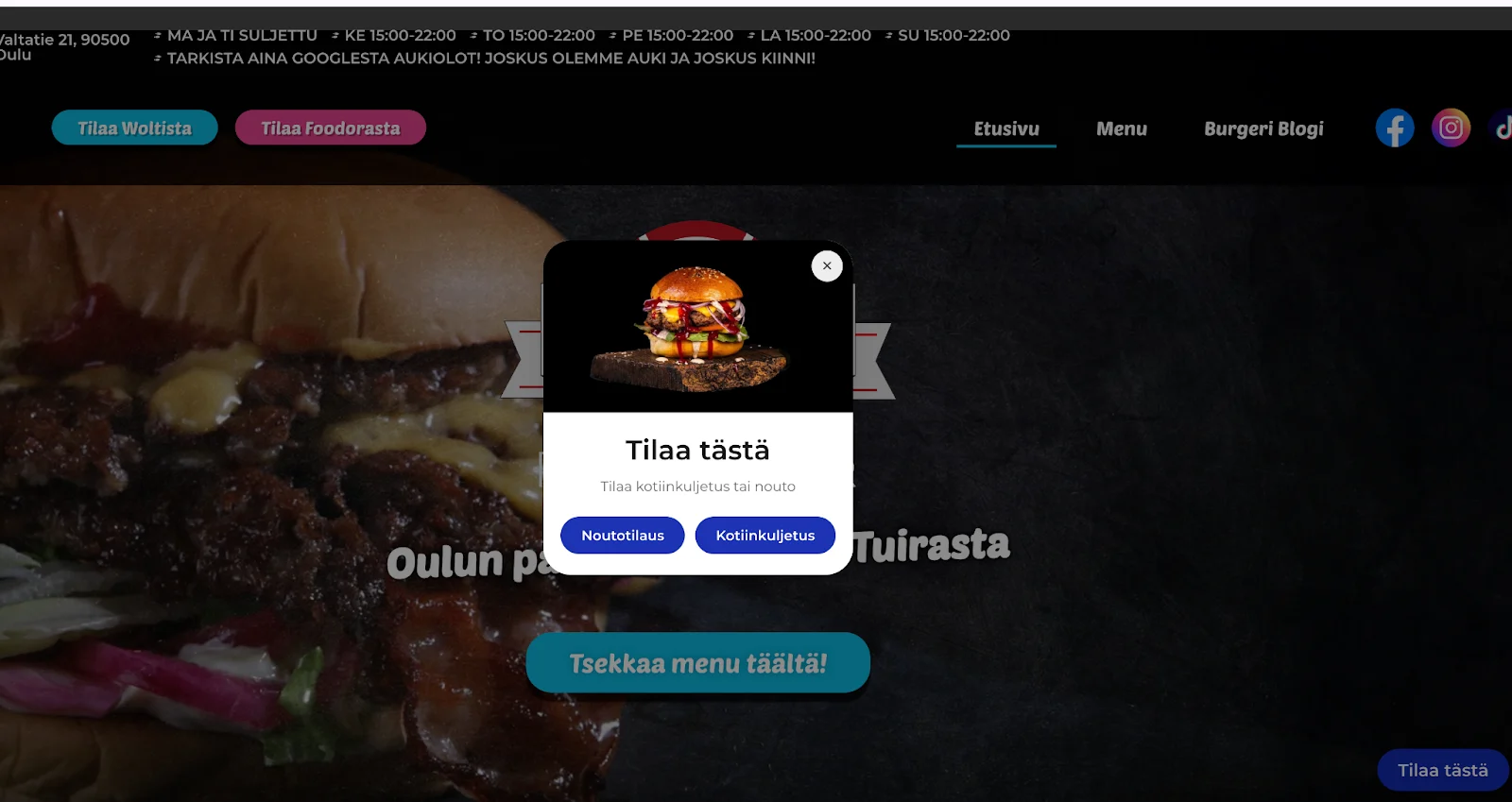
https://newyorkpizzaburger.fi/
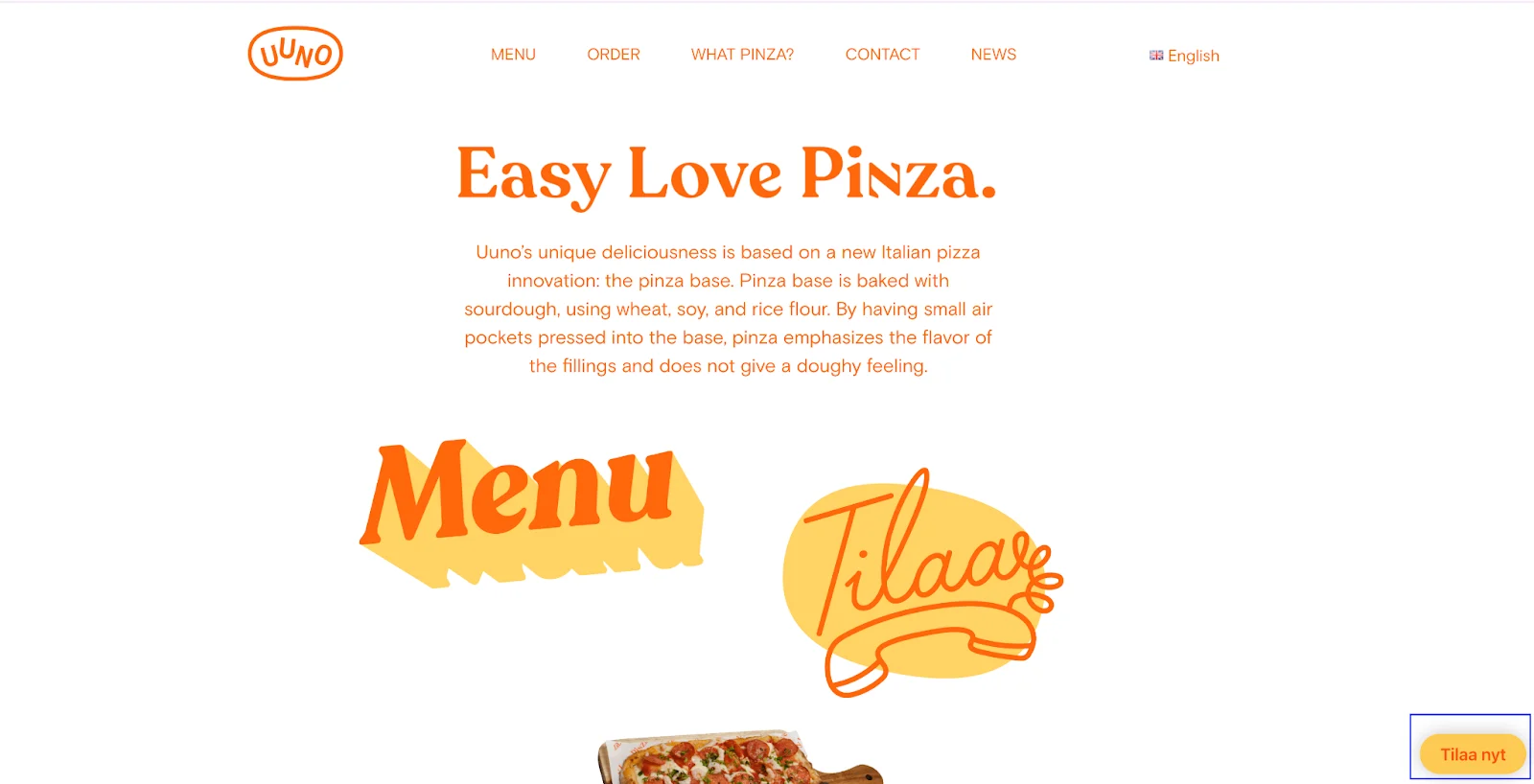
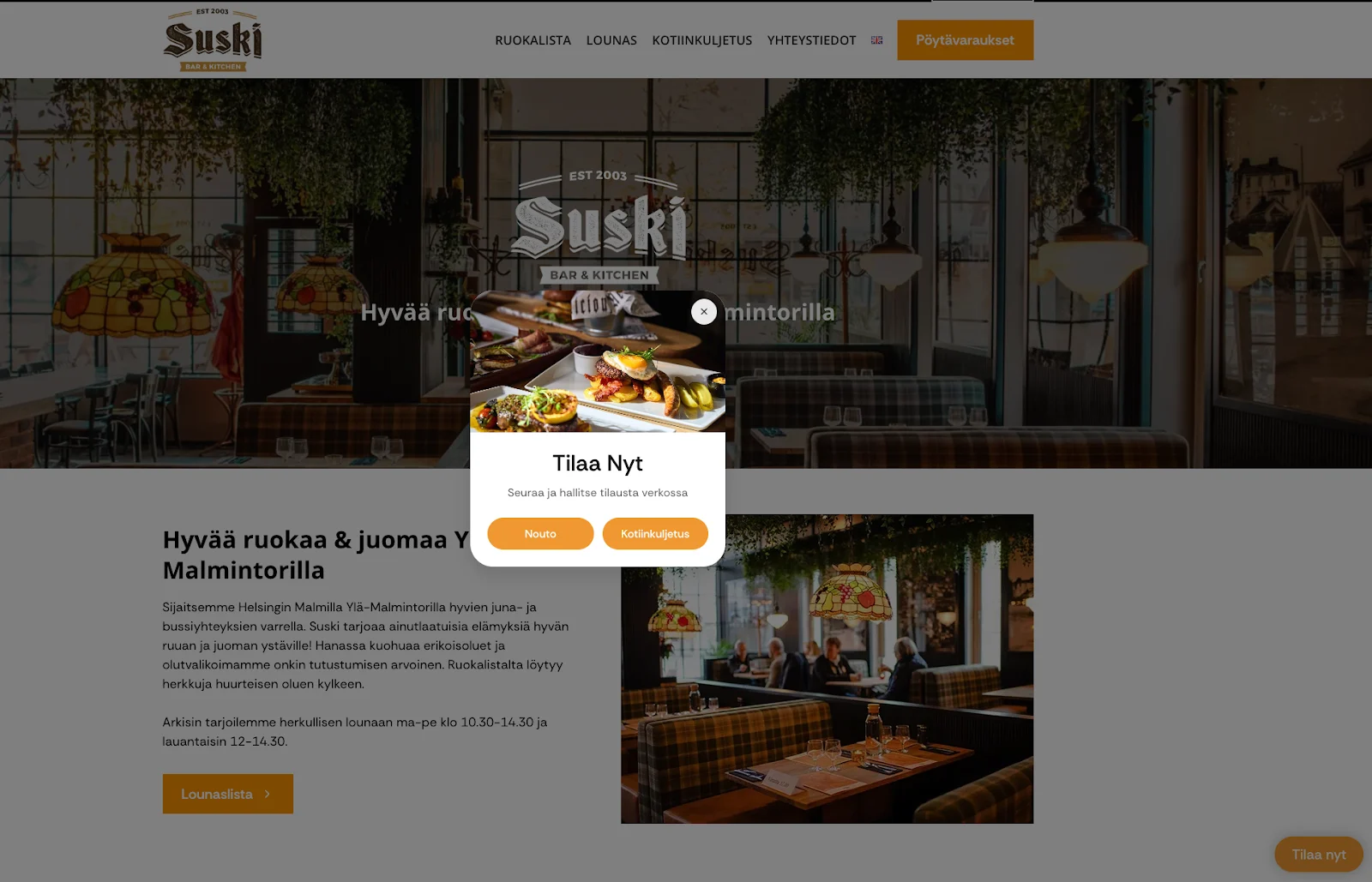
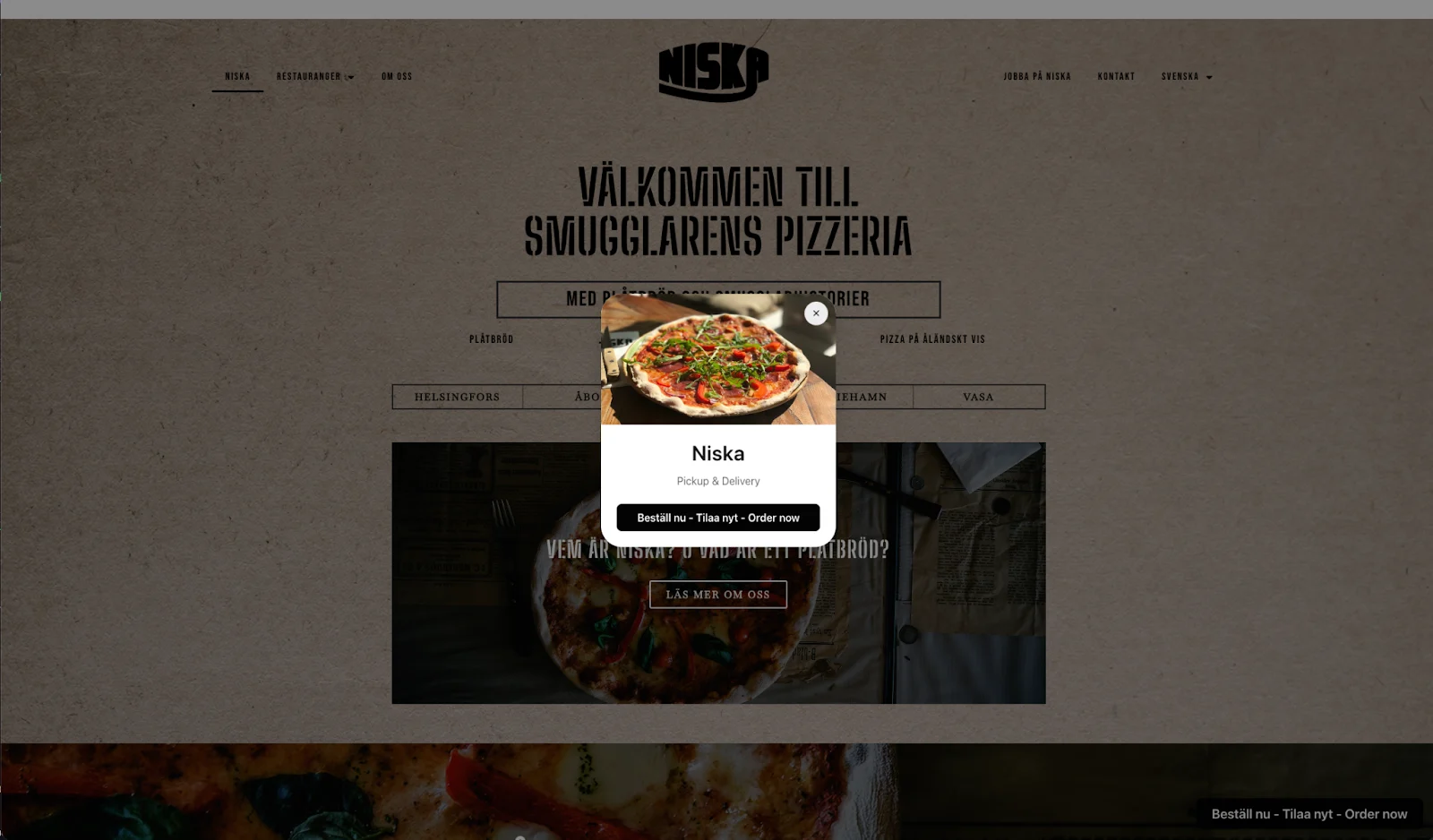
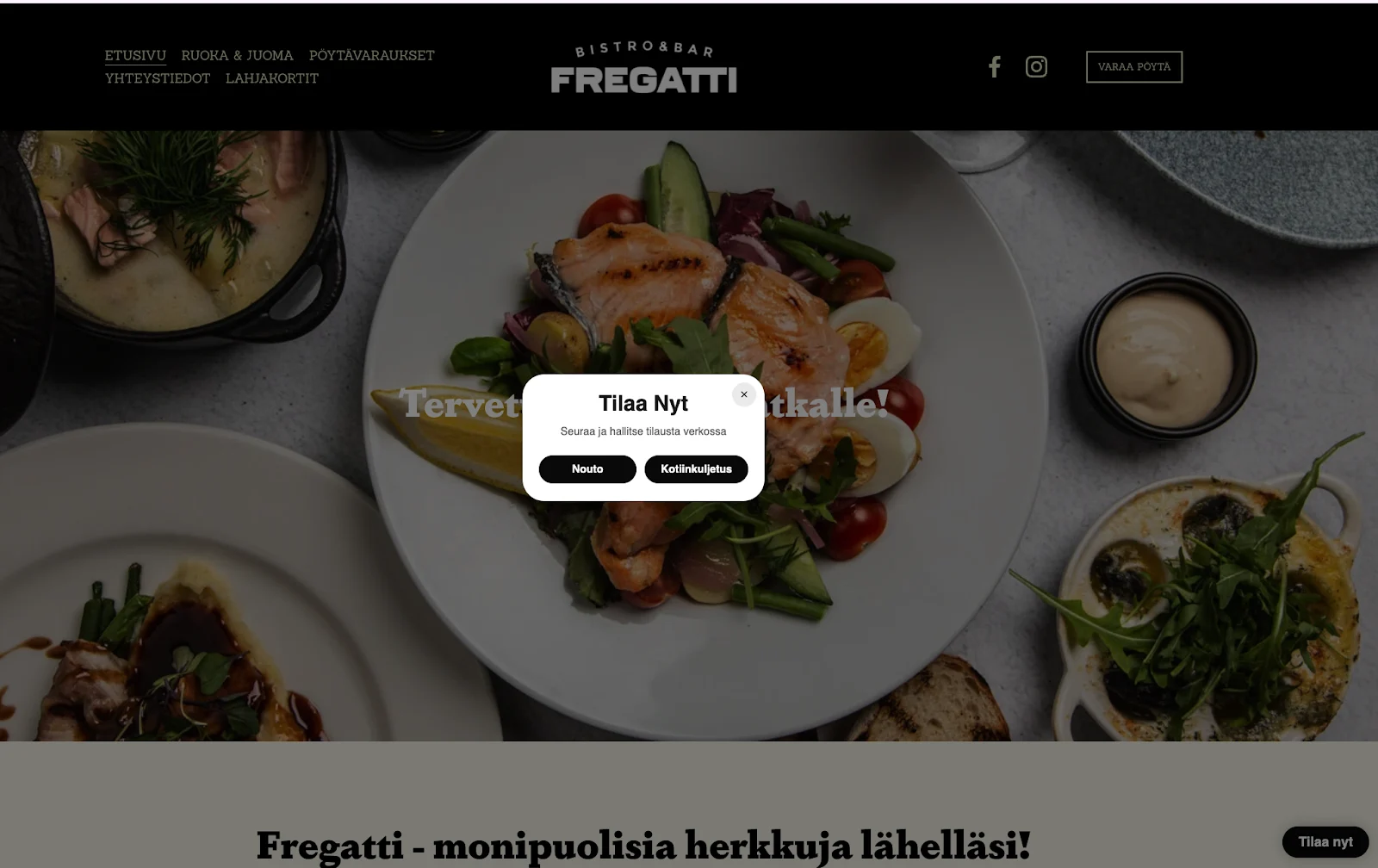
https://www.ravintolafregatti.fi/
Conclusion
The Storefront SDK was built to empower merchants with a simple, flexible way to integrate Wolt’s online ordering experience into their own websites without the need for custom engineering or complex setup. By focusing on a zero-config philosophy, modular architecture, and strong isolation via Shadow DOM and Emotion, we’ve created a toolkit that is both developer-friendly and production-ready.
Every design and infrastructure decision from on-demand component loading to shared pure components via NPM was made to ensure that merchants can go live faster, maintain consistency across environments, and scale with minimal overhead.
As we continue to evolve the SDK, we’re exploring support for additional widget types, page-level targeting, and broader customization options while keeping the core experience as seamless as possible.
Thanks for reading, and if you’re working on something similar or have ideas to share, we’d love to hear from you.