Tech
Ilona Shakurova
Oct 20, 2026
Source Maps in Production: Secure Debugging on Wolt.com

TL;DR
Production debugging is difficult when all you have is minified JavaScript. At Wolt, we wanted the benefits of source maps, clear stack traces, meaningful performance traces, and faster debugging, without exposing our source code.
In this post, we'll show how we built a secure production source map solution using Webpack, AWS S3, and an internal VPN-protected service. Engineers can access production source maps when they need them, while our application code remains protected.
Debugging frontend issues in production is rarely straightforward. Modern frontend applications are heavily optimised before they reach users' browsers. JavaScript is bundled, transpiled and minified for performance. That's great for page load times, but much less helpful when you're trying to understand an error stack trace or investigate a slow interaction.
At Wolt, this became a bottleneck while improving Core Web Vitals and investigating production issues. Without source maps, browser DevTools could only show heavily minified code, making it significantly harder to identify root causes and understand performance bottlenecks.
Simply publishing source maps wasn't an option, as they can expose application structure, internal logic, and sensitive information. So we set out to answer one question:
How can we use source maps in production without exposing our source code?
This article walks through the approaches we considered and the solution we ultimately built.
What are source maps?
Source maps connect transformed JavaScript back to the original source files used during development. They allow browser DevTools to display readable TypeScript or JavaScript instead of the bundled and minified code that runs in production.
Without source maps, stack traces and performance traces can be difficult to interpret because variable names, function names, and file structure have all been optimised away.
With source maps enabled, DevTools can reconstruct the original source, making production debugging significantly easier.
For example, consider the following TypeScript code:
Original TypeScript code
interface Product {
  name: string;
  price: number;
}

const filterProducts = async (products: Product[]): Promise<Product[]> => {
  return products.filter((product) => product.price > 20);
};

filterProducts([{ name: "Item A", price: 10 }, { name: "Item B", price: 30 }])
  .then((products) => console.log(products))
  .catch((err) => console.error(err));
Webpack is configured to generate source maps during the build:
Basic Webpack Configuration
module.exports = {
  entry: './src/filterProducts.ts',
  devtool: 'source-map',
  output: {
    filename: 'bundle.js',
    path: __dirname + '/static'
  }
};
During the build, Webpack generates both the production bundle and a corresponding source map.
Rather than showing the entire minified bundle, the important part is the line Webpack appends to the end of the generated JavaScript:
Generated source mapping reference
//# sourceMappingURL=filterProducts.js.map
This comment tells the browser where to find the source map, allowing DevTools to map the optimised production bundle back to the original TypeScript source.
Webpack also generates a .map file containing the metadata needed to perform that mapping:
Generated sourcemap by Webpack
{
  "version": 3,
  "file": "filterProducts.js",
  "sources": ["filterProducts.ts"],
  "names": [],
  "mappings": "AAAA,IAAI,SAAS,GAAG,CAAC,OAAO,KAAK,KAAK,CAAC,IAAI,CAAC,OAAO,EAAE,OAAO,EAAE,CAAC,GAAG,CAAC,GAAG,CAAC,CAAC"
}
Although browsers never execute the source map itself, DevTools uses it whenever you're debugging or profiling JavaScript.
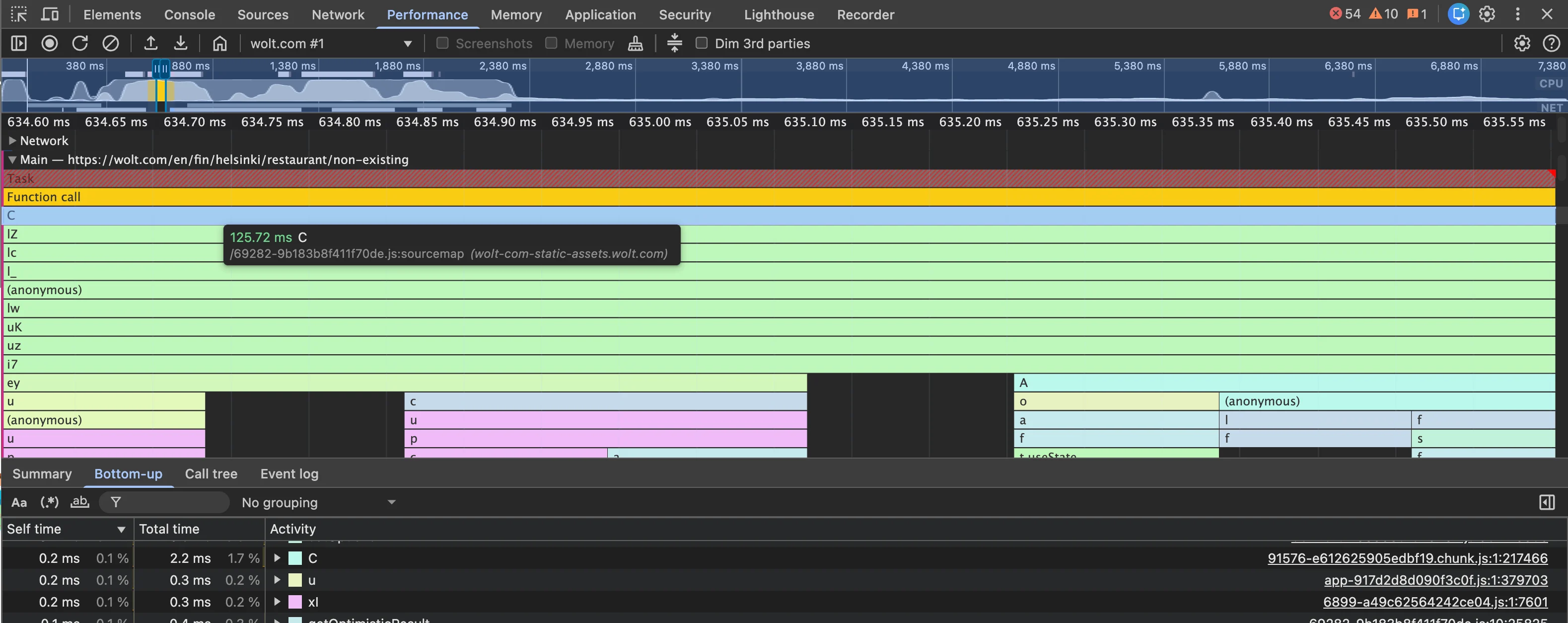
Without source maps
With source maps
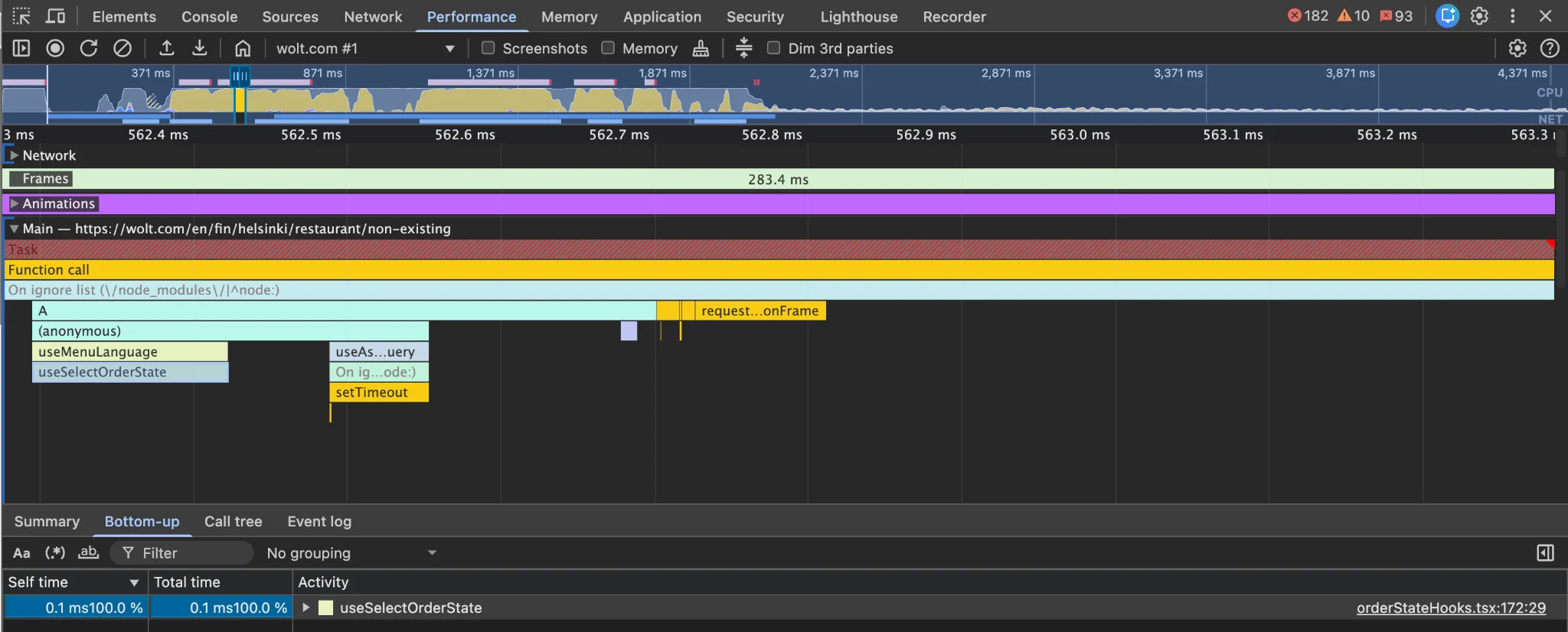
Without source maps, stack traces and performance profiles quickly become difficult to interpret, with function names reduced to single letters and little indication of where work is actually happening. With source maps enabled, original function names and source files are restored, making production debugging and performance analysis far more actionable.
How we built secure production source maps
For a long time, wolt.com didn't have source maps available in production. As our focus on frontend performance and production debugging grew, we started exploring ways to make source maps available without exposing them publicly.
We considered several approaches, including hosting source maps locally when needed and relying on our monitoring platforms. While both addressed parts of the problem, neither provided the seamless developer experience we were looking for.
One of our goals was to preserve the standard browser debugging experience, so engineers didn't need to learn new tools or workflows. That’s why we built a solution that serves source maps through an internal VPN-protected service.
Rather than relying on a single layer of protection, our implementation combines two independent security controls.
First, source maps are served through an internal endpoint that's only accessible while connected to our VPN.
Second, the AWS S3 bucket storing the source maps only accepts requests originating from our internal AWS network. Even if someone could somehow reach the storage layer directly, requests from outside our infrastructure would still be rejected.
This setup allows engineers to debug production code while keeping source maps accessible only to those with the right permissions.
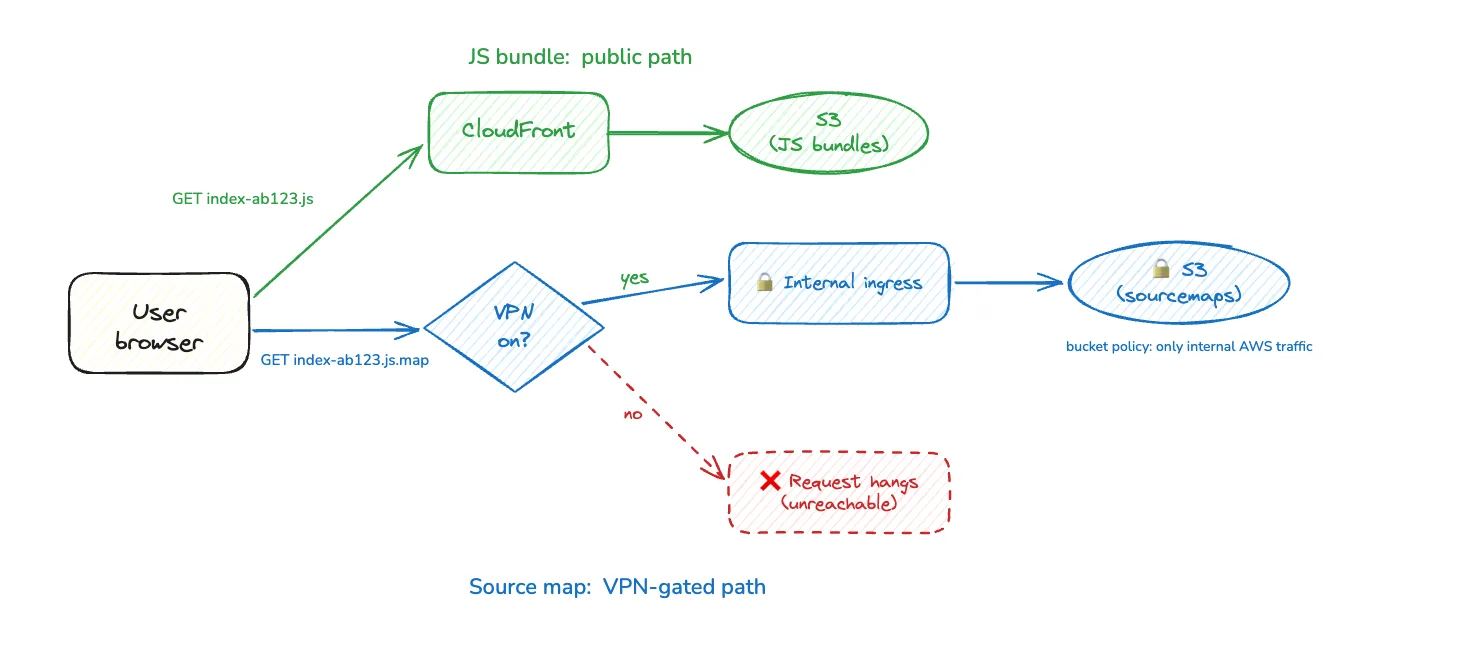
Figure: How JS bundles and source maps flow on wolt.com.
Implementation walkthrough
Once the overall architecture was in place, the implementation itself was relatively straightforward.
1. Generate source maps during the build
By default, Webpack generates source maps using the devtool option, often with a setting like 'source-map', which adds a comment at the end of the minified file:
//# sourceMappingURL=file.js.map
To have more control over where the source maps are hosted, we use the SourceMapDevToolPlugin in our Webpack configuration. This lets us specify a custom sourceMappingURL that points to an internal domain, protected behind a VPN:
plugins: [
new webpack.SourceMapDevToolPlugin({
filename: '[file].map',
append: `\n//# sourceMappingURL=${sourceMappingUrlPath}[url]`,
}),
As a result sourceMappingURL will look like this:
//#sourceMappingURL=https://sourcemaps.internal.com/foo/bar/123-4a5b6789.js.map
2. Upload source maps to AWS S3
During deployment, generated source maps are uploaded to dedicated S3 buckets, ensuring that they are stored securely and named properly based on the file structure for easy retrieval.
3. Serve source maps securely
When a page loads, the browser reads the sourceMappingURL specified in the minified JavaScript and sends a request to fetch the sourcemaps.
Whether that request succeeds depends on where it's coming from.
When VPN is On:
The internal ingress will route the request to the appropriate S3 bucket. The browser will fetch source maps allowing DevTools to automatically reconstruct the original TypeScript source for debugging and performance analysis.
When VPN is Off:
The request to fetch source maps will not resolve. It will hang pending as the internal domain and S3 buckets are inaccessible.
💡 Try it yourself
In Chrome DevTools, press Cmd + Shift + P (or Ctrl + Shift + P on Windows/Linux) and run "Show developer resources" to see the source map requests for the current page.
Conclusion
Production source maps have significantly improved how we debug frontend issues and investigate performance regressions on wolt.com.
Engineers can work directly with the original source code when analysing production behaviour, while our production bundles remain optimised and our implementation details stay protected.
The biggest impact has been performance work. Source maps make it much easier to investigate real-user performance traces, identify bottlenecks and improve Core Web Vitals such as LCP and INP.
If you're considering enabling source maps in production, you don't have to choose between security and developer experience. With the right architecture, you can have both.
Additional resources to read through:
If you’re interested in solving problems like this, take a look at our open engineering roles.